What Can You Actually Make With a Laser? A Beginner's Field Guide
You watched a few videos, maybe you already have a machine in a box in the garage, and now you're staring at it wondering what it actually does. Not "what projects can I copy," but what is this thing capable of? What's the shape of the possibility space?
Most laser content online skips that question and jumps straight to project lists. Lists are great when you already understand the machine. But if you don't yet have a mental model of what a laser can and can't do, a list of 50 projects is just 50 things you don't know how to evaluate.
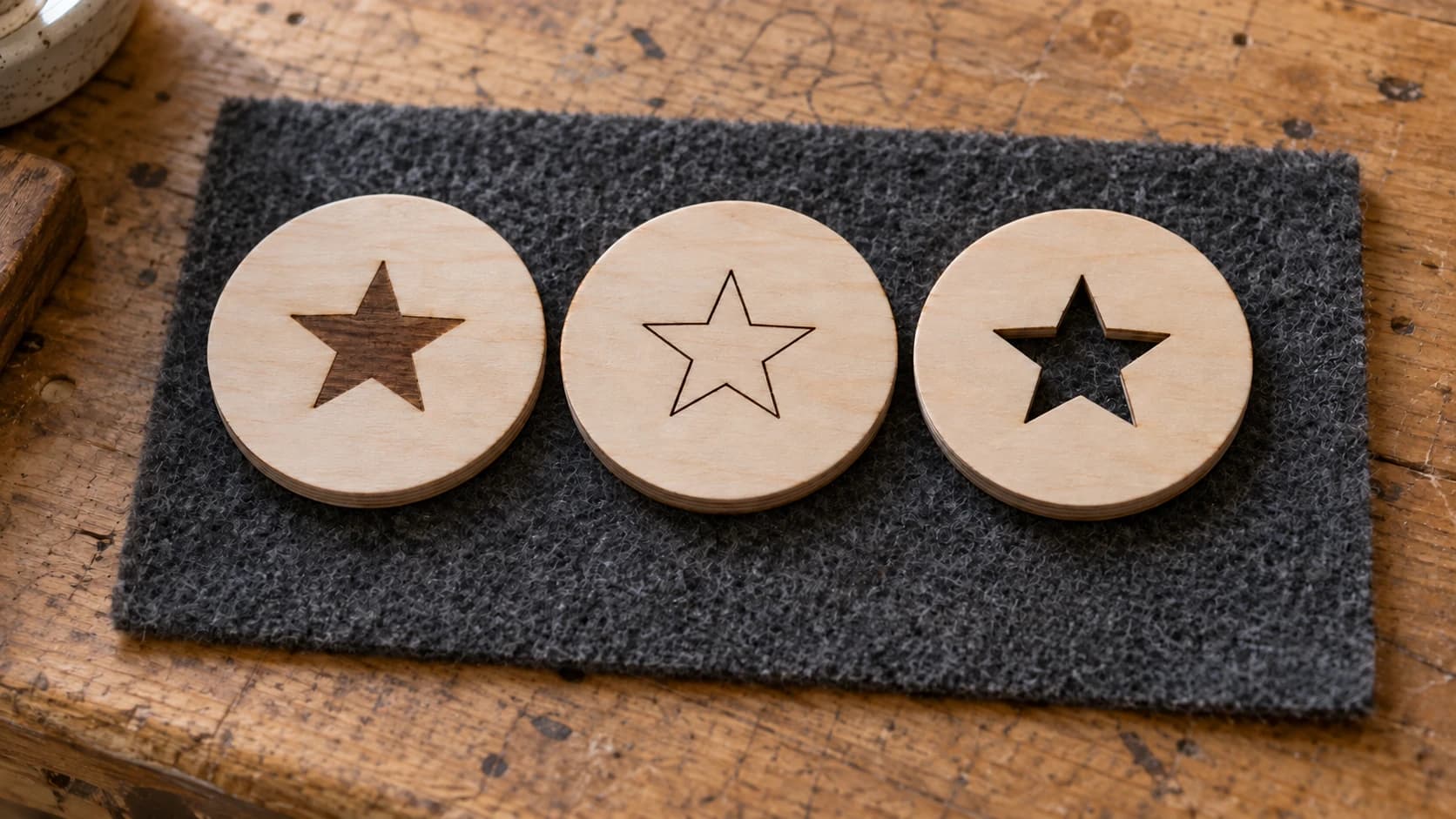
So this is a field guide organized by capability, not by project. A laser does three things: it engraves, it cuts, and it scores. Everything you've ever seen made on a laser is one of those three, or a combination.
Tip
Short answer: a laser engraver burns images and patterns into surfaces (wood, slate, leather, glass), cuts all the way through thin materials (plywood, acrylic, cardstock, leather), and scores light lines for detail or folding. Most finished pieces combine two of the three in a single job.
Engraving: Burning a Picture Into a Surface
Engraving is what most people picture first. The laser scans back and forth like an inkjet printer, and wherever it fires, it leaves a dark mark on the surface. The result looks like a photograph or drawing burned into the material: flat, permanent, and crisp.
One thing worth getting straight early: laser engraving is a surface scorch, not a carving. There's no real depth, no recesses you can feel with a fingernail. If you want sculpted 3D relief, that's a CNC router job. What the laser gives you instead is detail. It can reproduce a photo, a fine-line illustration, or an intricate pattern at a resolution no router bit can touch.
What people actually engrave:
- Photos on wood or slate. Pet portraits, wedding photos, memorial pieces. This is the single most popular laser gift category, and slate coasters with an engraved photo are a classic first project.
- Decorative patterns on coasters, flasks, cutting boards, and boxes. Scrollwork, mandalas, florals, geometric fills.
- Monograms and logos on leather patches, wooden signs, and tumblers.
- Glass frosting. A CO2 laser marks glass directly with a frosted etch. Diode lasers pass through clear glass, so diode owners use a coating or dark paint layer to get a mark.
Materials that engrave beautifully: wood (the lighter and more even the grain, the better the contrast), slate, leather, anodized aluminum, painted or coated metal, and glass. Bare shiny metal is the one that surprises people: a hobby laser can't engrave it without a marking spray, because the metal reflects the beam instead of absorbing it.
The catch with photo engraving is that a laser only understands black and white. A photo has to be converted into line art or a dither pattern before the machine can burn it, and doing that conversion badly is why so many first attempts come out as a muddy brown smudge. Photo Converter handles that step: upload a photo, get pen-and-ink style line art ready to engrave, including an inverted mode for slate and other dark materials where the laser mark comes out lighter than the surface.
For patterns rather than photos, DecoFill fills any shape outline with ornamental scrollwork in 65 styles, which is how you turn a plain coaster blank into something that looks hand-illustrated.
PRINT. CUT. CARVE.
- Multiple formats (SVG, DXF, PNG)
- Machine-tested designs
- Commercial licenses
Sponsored by PrintCutCarve.com
Cutting: All the Way Through
Point enough power at a thin material and instead of marking the surface, the beam goes through it. Now your laser is a cutting tool that follows vector lines with near-zero width, which means it cuts shapes no scroll saw or blade could manage: interior cutouts, sharp corners, filigree, tiny parts.
A good laser cut edge is its own signature. On wood it's smooth with a thin caramel-brown char. On acrylic (cut with a CO2 laser) the edge comes out glossy, almost flame-polished. There's no sanding a laser-cut snowflake ornament because there's nothing to sand.
What people actually cut:
- Earrings and jewelry from 3mm plywood, walnut, or acrylic. A massive Etsy category because one sheet of material yields dozens of pairs.
- Ornaments. Snowflakes, animals, personalized shapes. Thin, fast to cut, easy to sell in batches.
- Boxes with finger joints or living hinges, cut flat and assembled like a puzzle.
- Layered signage. Cut each element from a different material or color, stack and glue. This is how those dimensional business signs and multi-layer mandala wall art pieces are made.
- Cake toppers, puzzles, coaster blanks, stencils, model kits. Anything flat and intricate.
Cutting has a materials ceiling. Hobby lasers cut thin, organic, flat stock: plywood up to roughly 6mm reliably, solid wood a bit less, acrylic, cardstock, leather, cork, some fabrics. They do not cut metal. The fiber lasers that cut steel are a different class of machine entirely.
Every cut starts as a vector file, an SVG with paths for the machine to follow. That's where the design side of this hobby lives. MonoTrace converts any image into a clean cut-ready SVG for free, and Vector Studio generates an SVG from a text description when you need a design that doesn't exist yet. Describe "an ornate snowflake ornament" and you have a cuttable file in seconds.
Scoring: The Quiet Third Mode
Scoring is cutting's little sibling: the laser follows a vector line at low power, marking a thin line without going through. It gets a fraction of the attention engraving and cutting get, and it's doing quiet work in half the polished projects you've admired.
Scoring is how you add fine detail lines fast. Engraving a large area takes time because the laser rasters back and forth over every millimeter. A scored outline takes seconds. Face details on a cut animal ornament, fold lines on cardstock packaging, decorative line work on a box lid, alignment marks for assembly: all scoring.
If you look closely at a well-made laser piece, you'll often find all three modes in it. The maker engraved the artwork, scored the fine outlines, and cut the final shape, all in one job.
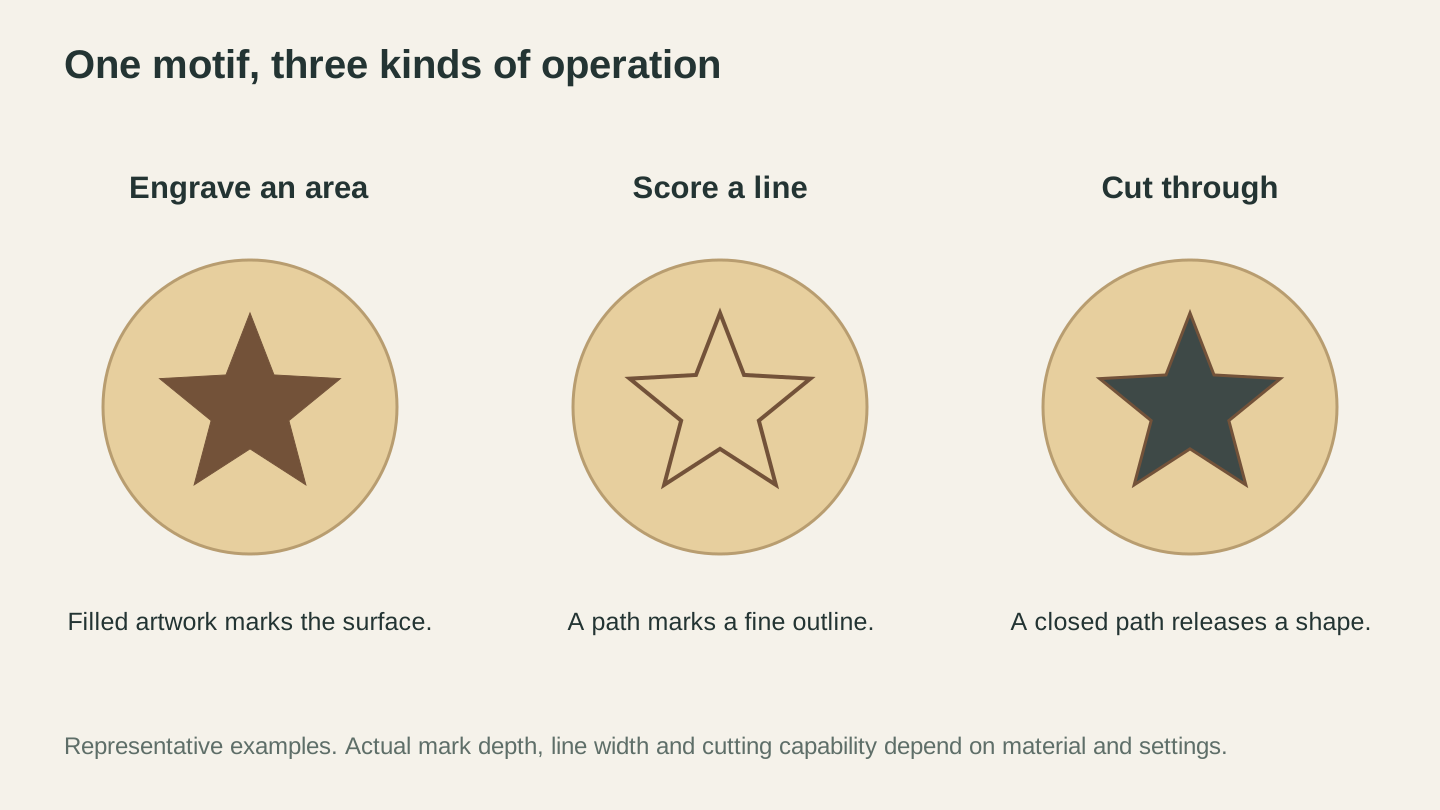
The same motif can be an area mark, a fine outline or an opening. Assign the intended operation in the laser software and test it on the chosen material.
Diode vs CO2: Where the Machine Type Gates What's Possible
Most beginner machines are diode lasers, and most of what's in this guide works fine on one. But the two common laser types have real capability differences, and a few popular projects are gated behind CO2.
| Capability | Diode laser | CO2 laser |
|---|---|---|
| Engrave wood, slate, leather | Yes | Yes |
| Cut plywood up to ~6mm | Yes, slower, more passes | Yes, fast |
| Cut clear acrylic | No, the light passes through | Yes |
| Cut dark or opaque acrylic | Some machines, check yours | Yes |
| Engrave glass directly | No, needs a coating trick | Yes |
| Cut cardstock, leather, cork | Yes | Yes |
| Engrave bare metal | Marking spray required | Marking spray required |
The clear acrylic row is the one that trips people up. Blue diode light goes straight through clear acrylic like a flashlight through a window, so nothing happens no matter the power. If glossy edge-lit acrylic work is what drew you to lasers, you need CO2. Our acrylic cutting guide covers which acrylics work with which machines.
None of this makes a diode a lesser purchase. For wood, slate, and leather work, which is most of the beginner and most of the Etsy market, a diode does everything above. If you're still choosing a machine, the best laser engravers for beginners guide breaks down the options.
Materials: The Short Safe List and the Hard No List
Safe and rewarding: wood and plywood, slate, leather (vegetable-tanned), cardstock and paper, cork, anodized aluminum, glass (CO2), acrylic (with the caveats above), and stone or ceramic tile. If you're deciding what wood to start with, see best wood for laser engraving.
Warning
Never laser PVC or vinyl. Chlorinated plastics release chlorine gas when lasered. It will corrode your machine and it is genuinely dangerous to breathe. That includes vinyl sheets, faux leather of unknown composition, and anything labeled PVC. Cutting machine vinyl belongs in a Cricut, never a laser. Other materials to refuse: polycarbonate (Lexan) chars and catches fire rather than cutting, ABS melts into toxic mess, and any mystery plastic should be treated as unsafe until identified.
The rule that keeps you safe: know what the material is before it goes in the machine. "It looks like acrylic" is not identification. Reputable laser material suppliers label their stock precisely for this reason.
How It All Combines
Once the three capabilities click, project ideas stop being mysterious and start being obvious combinations:
- Engraved coaster: engrave a pattern or photo, then cut the circle. Two modes, one job.
- Personalized ornament: engrave the artwork, score the fine details, cut the outline with a hanging hole.
- Layered sign: cut shapes from two or three sheets, engrave detail on the top layer, stack and glue.
- Leather patch: engrave the logo, cut the patch shape, sew or press it onto a hat.
- Photo slate: engrave only. Sometimes one mode is the whole project.
Read any laser project you admire through this lens and you can reverse-engineer it: which parts are engraved, which lines are scored, where the cuts are. At that point you don't need someone else's project list. You can look at a blank coaster and see what it could become.
Where to Go From Here
This guide is the map. The next steps depend on which direction pulled at you:
- Ready to actually run your first job? The laser engraving beginner's guide walks through setup, focusing, and first burns step by step.
- Want a big pile of specific project ideas now that you can evaluate them? Browse cool things to laser engrave.
- Thinking this could pay for itself? There's a whole business angle to laser work.
And whatever you make first, it starts with a file. Convert an image you already have into a cut-ready SVG with MonoTrace, which is free, or turn a favorite photo into engravable line art with Photo Converter. Then put a coaster blank on the bed and burn something.
Related Tools
MonoTrace
Turn photos and artwork into SVG outlines for free, with an optional sketch mode.
Photo Converter
Convert a photo into engraving-oriented line art with standard or inverted output.
DecoFill
Generate decorative artwork inside an uploaded outline, then prepare PNG or traced SVG output.
Vector Studio
Generate SVG artwork from a written prompt and selected style.
Ready to try these tools?
Sign up free, no credit card required. Free tools available immediately.
Start Free